Kisi-kisi Soal UTS dan UAS Elektronika Beserta Jawaban

SOAL A 1) Berikut ini yang termasuk komponen elektronika dengan jenis komponen pasif yaitu ....

Kisi-kisi Soal UTS dan UAS Sistem Terdistribusi Beserta Jawaban

SOAL A 1. Berikut ini yang merupakan karakteristik dari definisi sistem terdistribusi adalah ....

Remove Bios Password and Harddissk (HDD) Laptop

I think to remove the bios password on an average PC is already can, although without having to memorize the password. the system jumpers or removing battery bios. ever see a supervisor, admin, system, HDD, bios, setup password?

Memperbaiki Kick Starter Motor Matic

Motor Matic is a motor that is the easiest to use and most in our homeland. please note that the motor also takes care of very sensitive, just like a computer that also takes care of sensitive anyway.

Gejala Kerusakan Mesin Air Submersible Metabo

Mesin Air Submersible atau yang sering disebut kebanyakan orang (satelit) ini sangat bagus, dengan sistemnya yang canggih dan fleksible. tipe mesin yang berbasis kerja di dalam tanah dan hanya menggunakan satu pipa ini, sangat berguna untuk anda yang memiliki banyak lumpur atau air kuning setelah pengeboran.

12 March 2012

VLSub, ekstensi VLC untuk mencari subtitles secara otomatis


Kalian sering nonton film di Ubuntu? Apa aplikasi pemutar film favoritmu? Kalo kalian suka pake VLC, ada addons keren nih yang patut dicoba. Namanya VLsub, ini adalah addons dari VLC yang berfungsi untuk mencari subtitles secara otomatis. Bahasa yang disupport mencakup 39 bahasa termasuk Indonesia. Tertarik mencoba? Yuk kita install. :D

1. Download dulu VLSub nya disini

2. Buat direktori untuk meletakkannya.

mkdir -p ~/.local/share/vlc/lua/extensions

3. Kopikan file VLsub.lua ke folder yang telah kalian buat tadi di ~/.local/share/vlc/lua/extensions. Itu letaknya di home folder kalian, tekan ctrl + H untuk mencari folder .local yang terhidden.

4. Setelah dikopi, sekarang buka VLC. Di bagian menu view, disitu nanti jadi ada pilihan VLSub.


Lalu untuk mencari subtitlenya pilih Video hash dan Indonesian kemudian klik Go.


Semoga bermanfaat :)
Share:

11 March 2012

Trik mempercepat koneksi internet di Ubuntu


Ada sedikit trik nih buat mempercepat koneksi internet di Ubuntu. Sistem kerjanya yaitu mengoptimalkan kecepatan reload data saat kita berinternet. Jadinya nanti di browser akan terasa lebih cepat memunculkan halaman. Silahkan di review sendiri-sendiri deh ya. :D kalo di mesin saya sih trik ini lumayan kerasa. :D

Yuk langsung aja, berikut cara-caranya :

1. Buka terminal, lalu ketikkan perintah berikut :

sudo gedit /etc/sysctl.conf

2. Lalu kopikan skrip berikut di baris paling bawah :

# increase TCP max buffer size setable using setsockopt()

net.core.rmem_max = 16777216
net.core.wmem_max = 16777216
# increase Linux autotuning TCP buffer limits
# min, default, and max number of bytes to use
# set max to at least 4MB, or higher if you use very high BDP paths
net.ipv4.tcp_rmem = 4096 87380 16777216
net.ipv4.tcp_wmem = 4096 65536 16777216
# don't cache ssthresh from previous connection
net.ipv4.tcp_no_metrics_save = 1
net.ipv4.tcp_moderate_rcvbuf = 1
# recommended to increase this for 1000 BT or higher
net.core.netdev_max_backlog = 2500
# for 10 GigE, use this, uncomment below
# net.core.netdev_max_backlog = 30000
# Turn off timestamps if you're on a gigabit or very busy network
# Having it off is one less thing the IP stack needs to work on
#net.ipv4.tcp_timestamps = 0
# disable tcp selective acknowledgements.
net.ipv4.tcp_sack = 0
#enable window scaling

net.ipv4.tcp_window_scaling = 1


Save (CTRL + S) lalu keluar.

3. Aktifkan settingan diatas dengan cara ketik :

sudo sysctl -p

Semoga bermanfaat :)

SUMBER
Share:

10 March 2012

Cara mengganti Plymouth Ubuntu 11.10


Bosan dengan penampilan plymouth Ubuntu 11.10 mu? Yuk kita ganti :D Jika dulu saya menggunakan Super Boot Manager untuk menggonta-ganti tema plymouth Ubuntu saya, sekarang di Ubuntu 11.10 ternyata ada cara yang lebih mudah lho. Caranya yaitu menggunakan aplikasi bernama Plymouth Manager. Tertarik? Mari kita install :)

1. Buka terminal, lalu ketik baris mantra berikut :

sudo apt-add-repository ppa:mefrio-g/plymouthmanager
sudo apt-get update
sudo apt-get install plymouth-manager


2. Jalankan aplikasinya :D Untuk penggunaannya kalo ga ngerti kebangetan :p gampang kok tinggal klak-klik doang. :)


Semoga bermanfaat :)
Share:

09 March 2012

Cara mengganti login screen Ubuntu 11.10


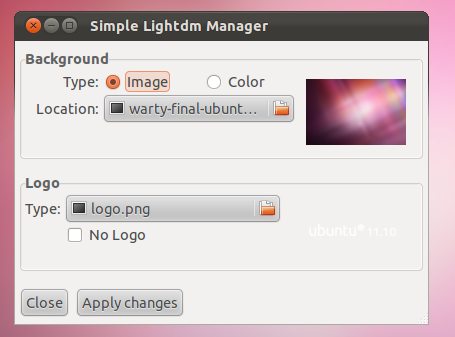
Dulu saya pernah memposting tentang cara bagaimana mengganti background login screen di Linux Mint Katya kalau enggak salah. Cara itu sangat ampuh sekali dan selalu berhasil. Tapi suatu ketika saat teman saya yang ber-OS Ubuntu 11.10 mencoba menggunakan cara tersebut untuk mengganti login screennya, ternyata tidak bisa. Selidik punya selidik ternyata ini akibat perbedaan sistem login yang di gunakan oleh kedua OS tersebut. Linux Mint Katya masih menggunakan GDM sedangkan Ubuntu 11.10 sudah menggunakan lightdm sebagai login screennya.

Tapi tenang saja, untuk Ubuntu 11.10 ada juga kok caranya. Bahkan lebih mudah. Kalian cukup dengan mendownload aplikasi simple-lightdm manager disini, setelah itu install dengan mengklik dua kali saja, lalu jalankan dengan membukanya lewat menu dash.


Kemudian tinggal kalian pilih mau pakai background apa.


Dan, Walla! Tampilan login screen Ubuntu 11.10 kalian pun telah berubah. :D


Semoga bermanfaat :)

SUMBER
Share:

07 March 2012


Open source enthusiasts have been patiently (or maybe impatiently) waiting for the KDE Spark tablet to be available. A couple weeks ago, it was available for preorder. Yet, the wait still continues for consumers to be be able to actually get their hands on the device. Or do we have to wait? The Spark tablet is technically a rebranded device that will ship with KDE Plasma Active. You can purchase the tablet itself NOW here for only $103.08.

With that being said, the Spark tablet (or as the unrebranded Zenithink C71 ZT280 as it is called) does not run KDE Plasma Active. It ships with Android 4.0 Ice Cream Sandwich. I wouldn’t know if it has the same unlocked bootloader that would allow you download and install KDE yourself. I would image it does, just don’t quote me on that.

http://joesteiger.com


Share:

NVIDIA Is Joining The Linux Foundation

Posted by Michael Larabel on March 07, 2012

NVIDIA will be joining the Linux Foundation, per an announcement coming out in the morning. But for open-source Linux fans, will this be a reason to rejoice about NVIDIA potentially moving forward with open-source drivers? Don't break out the champagne quite yet.

NVIDIA is getting in bed with the Linux Foundation, along with three other to-be-announced companies, as the latest effort to expand this Linux organization. However, it's looking to be more of a mobile play for the company rather than to get in on the open-source GPU driver space by either supporting the open-source Nouveau driver project, to put out other code and documentation, or some other organized effort. The area that's hot right now is their Tegra platform.

NVIDIA's had years to change their position on Linux graphics driver licensing, but they haven't for well-known reasons with their shared code-base between platforms, interwoven third-party intellectual property, and other competitive reasons. They also seem quite happy with their current approach of working on their first-rate Linux/BSD/Solaris proprietary graphics driver that shares many of the same features and performance abilities with their official Windows driver. NVIDIA's stance on the Nouveau project has been to not do anything to help nor hinder the project.

NVIDIA says they are committed to the best experience and innovation with their GPU and mobile products, from Wednesday's announcement catering to Linux fans. By joining the Linux Foundation they hope to increase their collaboration with Linux stakeholders in order to benefit users and developers. (One recent example of attempted collaboration was NVIDIA trying to collaborate with Linux kernel developers about using the DMA-BUF infrastructure within their drivers, but that was largely rejected by kernel developers on licensing merits.)

Many NVIDIA GeForce customers are quite satisfied with the NVIDIA Linux status quo considering that their proprietary Linux driver does generally work very well, is actively supported, quickly supports new versions of the Linux kernel and X.Org, timely enables new hardware at launch, and all-around tends to work great for its users. The reverse-engineered Nouveau driver is available, but its performance is not always great, burns through excessive power, and has other feature limitations.

In the mobile space, the NVIDIA Tegra graphics are powered by a binary blob. They do have open kernel patches and other work already for the less controversial areas of their multi-core ARM platforms. They do make their Tegra Linux ARM experience not too bad by offering an Ubuntu-based spin and a fair amount of documentation to get started (I'm currently working on some benchmarks for them from their quad-core Tegra 3 development tablet and previously provided NVIDIA Tegra 2 benchmarks).

While some are getting excited after sharing this news of NVIDIA joining the Linux Foundation, again, it doesn't necessarily mean any fundamental changes. Joining the Linux Foundation as a corporate member basically means you're providing money and other resources to this non-profit Linux group. Members of the Linux Foundation aren't mandated to open-source their software, port their software to Linux, or to otherwise become a Linux saint.

Among the many Linux Foundation members are VIA (their open-source strategy failed and really haven't been doing anything), AMD (they're still happy with their Catalyst binary blob while the open-source support is still lagging), Adobe (they abandoned Flash Player for Linux and most of their software is not available natively under Linux), Oracle (enough said with their share of controversies in various open-source communities), and a host of mobile-focused firms like ARM / Qualcomm / Samsung that don't ship full open-source graphics drivers for Linux (the best case to date for them has been open-source kernel drivers with closed-up user-space components, some of which are being reverse-engineered).

As far as end-users are directly affected, being on the Linux Foundation member list is almost like being on the Free Software Foundation's high priority project list, which comes without any guarantees. It would be wonderful if NVIDIA joining the Linux Foundation marked some fundamental shift to dramatically enhance the NVIDIA Linux user/developer experience, but at least for now it doesn't look that way.
Share:

Blog Archive