dzink... langsung aja deh..
Langkah-langkah installasi Apache, MySql dan PHP :
===================================================
sudo aptitude install apache2 php5-mysql libapache2-mod-php5 mysql-server===================================================
Tunggu sampai prosesinya selesai, dan kita akan diminta untuk mengisi pasword root MySql dengan pertanyaan seperti ini :
“
Do you want to continue? [Y/n/?]” ketik "
Y" dan Enter, kita akan mengisi password tersebut 2 kali & harus sama jo..
Setelah mengisi password tersebut, maka kita telah memiliki web server. Kok, simple yah ? ;) Untuk mengeceknya, di browser, kita ketikkan
============================== http://localhost==============================atau bisa juga dengan mengetikkan ip komputer kita. Kalau kita tidak mengetahui ip tersebut, kita bisa mengetikkan :
==============================ifconfig | grep inet==============================maka kurang lebih akan keluar seperti ini jo..
==============================================
inet addr:
192.168.1.10 Bcast:192.168.1.255 Mask:255.255.255.0
inet6 addr: fe80::20c:29ff:fe33:c939/64 Scope:Link
inet addr:127.0.0.1 Mask:255.0.0.0
inet6 addr: ::1/128 Scope:Host
*Note :
yang tebel adalah ip komputer kita==============================================
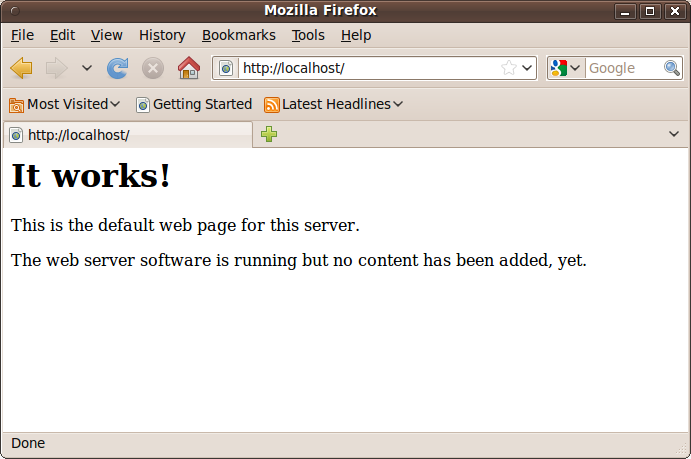
Nah giliran test (lagi) di browser, kalau keluar seperti ini,
 |
| http://localhost/ |
==============================================
itu artinya kita telah sukses bener jo...
Kalau kita ingin mengedit konfigurasi Apache, sebaiknya kita backup file konfigurasi aslinya. Nah itu bisa kita lakukan dengan jalan :
=================================================
sudo cp /etc/apache2/apache2.conf /etc/apache2/apache2.conf.bak
=================================================
Begitu juga dengan konfigurasi PHP nya di file php.ini, perintahnya ini jo..
=================================================
sudo cp /etc/php5/apache2/php.ini /etc/php5/apache2/php.ini.bak
=================================================
Kalau mau mengeditnya, kita bisa pakai teks editor favorit kita, misalnya ini :
=================================================
sudo gedit /etc/php5/apache2/php.ini*
gedit bisa diganti lainnya, misal vi atau nano atau apalah lainnya ;)=================================================
Nah jo.. kalau kita selesai mengedit file konfigurasi-nya, maka biar setingan baru dijalankan, maka kita perlu untuk me-
restart apache kita dengan perintah :
=================================================
sudo /etc/init.d/apache2 restart=================================================
Misalnya akan keluar seperti ini jo..
root@ubuntu:/home/joherujo# sudo /etc/init.d/apache2 restart
* Restarting web server apache2 apache2: Could not reliably determine the server's fully qualified domain name, using 127.0.1.1 for ServerName
... waiting apache2: Could not reliably determine the server's fully qualified domain name, using 127.0.1.1 for ServerName
[ OK ]
*
Sory ga sempet bikin snapshoot-nya joBeres dah, setingannya. Oia... default dokumen untuk root-nya ada di
/var/www . Sebagai contoh, coba buat 1 file bernama
info.php dalam folder /var/www dan nanti kita pangggil lewat browser.
Bikinnya gini jo...
=================================================
sudo gedit/var/www/info.php=================================================
Didalam teks editor kita isi dengan yang ini
=================================================
=================================================
Simpan dan keluar dari teks editor kita, dan cobalah memanggilnya di web browser dengan nulis seperti ini :
=================================================
http://localhost/info.php=================================================
Dan lihat hasilnya dech... ;)
+-+Mozilla+Firefox.png) |
| http://localhost/info.php |
itu artinya.... hehe... gudlak aja jo...
Eh.. ada yang lupa jo... kita install sekalian aja phpmyadmin-nya
=====================
aptitude install phpmyadmin
=====================
Tunggu beberapa saat sampai prosesinya selesai. Kalau ada pertanyaan untuk isi password phpmyadmin-nya isilah password itu dan ketika ada pilihan untuk menjalankan phpmyadmin antara apache dan lighhttp checklist aja deh. Hehe... bisa kita coba di web browser kita, bisa ngga phpmyadminnya ya? cukup ketikkan
http://localhost/phpmyadmin |
| http://localhost/phpmyadmin/ |
Udah ah... 



+-+Mozilla+Firefox.png)


